
CVEdge: A Vibe Coding Experiment in AI-Powered Career Tools
A personal side project built entirely through conversational AI — exploring design intuition, prompt engineering, and rapid product development.
Project Overview
- Role — Designer who codes (vibe coding)
- Timeline — Ongoing side project (2025–2026)
- Built with — Claude Code, Next.js 14, Supabase, Gemini 2.5 Flash
- Method — 100% AI-assisted development through prompt engineering
- Status — Live hobby project — thecvedge.com
What is this?
CVEdge started as a personal curiosity: how far can a designer go building a real product using only conversational AI and design instinct — without writing a single line of code manually?
The answer turned out to be: surprisingly far.
Over several months of evenings and weekends I built a full-stack AI-powered CV optimisation tool — 11 templates, ATS scoring engine, AI rewrite system, git-diff review UX, job match engine, interview coach, E2E testing infrastructure, CI/CD pipeline, and admin panel — entirely through Claude Code prompts.
This case study is less about the product and more about what I learned designing at the intersection of AI, prompts, and product intuition.
The Vibe Coding Approach
What is vibe coding?
Vibe coding is building software through natural language — describing what you want to an AI coding assistant and iterating through conversation rather than writing code manually. The designer's role shifts from writing implementation to directing intent.
For a designer this is transformative. The gap between having an idea and seeing it rendered — historically measured in days or weeks — collapses to minutes.
My Workflow
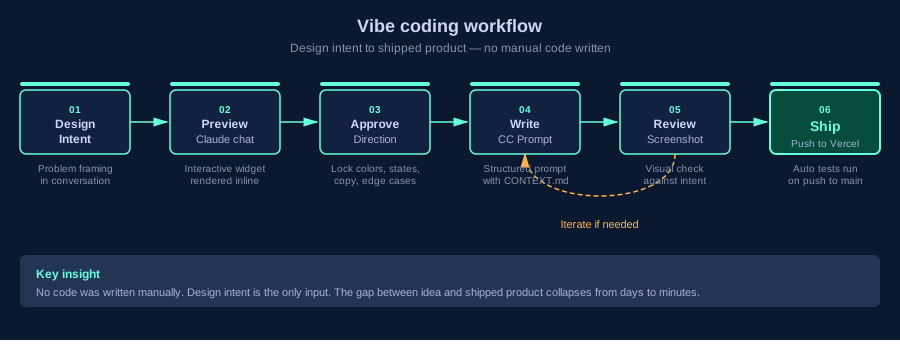
Every feature followed this exact sequence:
- Think through the design problem in conversation with Claude
- Preview the UI using interactive widgets rendered in chat — before any code is written
- Lock the design decisions explicitly — colors, interactions, edge cases, what to remove
- Write a structured prompt to Claude Code with exact specifications
- Review the output — screenshot back, iterate if needed
- Ship — push to Vercel, tests run automatically
Why this matters for design leadership
Traditional design → development handoff has a fundamental problem: things get lost in translation. Designers describe intent, developers interpret it, something different ships.
Vibe coding eliminates the translation layer. As a designer I could specify exact hex values, exact interaction states, exact copy, what to remove, and mobile behaviour explicitly. The output was closer to design intent than any handoff process I have experienced.
The Challenge
The Problem
75% of CVs are rejected by ATS software before a human recruiter ever reads them. Most job seekers never know this is happening — they assume their experience isn't good enough, when the real problem is their CV isn't structured the way ATS software expects.
Every tool that tried to solve this charged $19–$29/month — creating a painful irony: the people who most need help getting a job can least afford to pay for it.
The Problem in Numbers
- 75% of CVs rejected by ATS before a recruiter reads them
- 63% of job seekers have never heard of ATS software
- 54% reuse the same CV for every application
- 82% of rejected candidates never receive feedback on why
- 91% who know about ATS want a free tool to check their CV
Business Impact
- $19–$29/month average cost of existing tools — unaffordable during job search
- 4–6 weeks average job search duration, extended by avoidable CV rejections
- No tool connects CV quality → job matching → interview preparation in one flow
- Job seekers blame themselves for rejections caused by formatting
The Competitive Gap
| CVEdge | Jobscan | Resumeworded | Enhancv | Kickresume | Teal | Resume.io | |
|---|---|---|---|---|---|---|---|
| Price | Free forever | $29/mo | $29/mo | $24.99/mo | $19/mo | $29/mo | $2.95/wk |
| ATS Score | |||||||
| AI Fix / Rewrite | |||||||
| Job Match | |||||||
| CV Tailor per JD | |||||||
| Cover Letter | |||||||
| Interview Prep | |||||||
| Templates | 11 | — | — | 20+ | 35+ | — | 25+ |
| Free Forever | |||||||
| Full Stack |
Full support Partial Not available
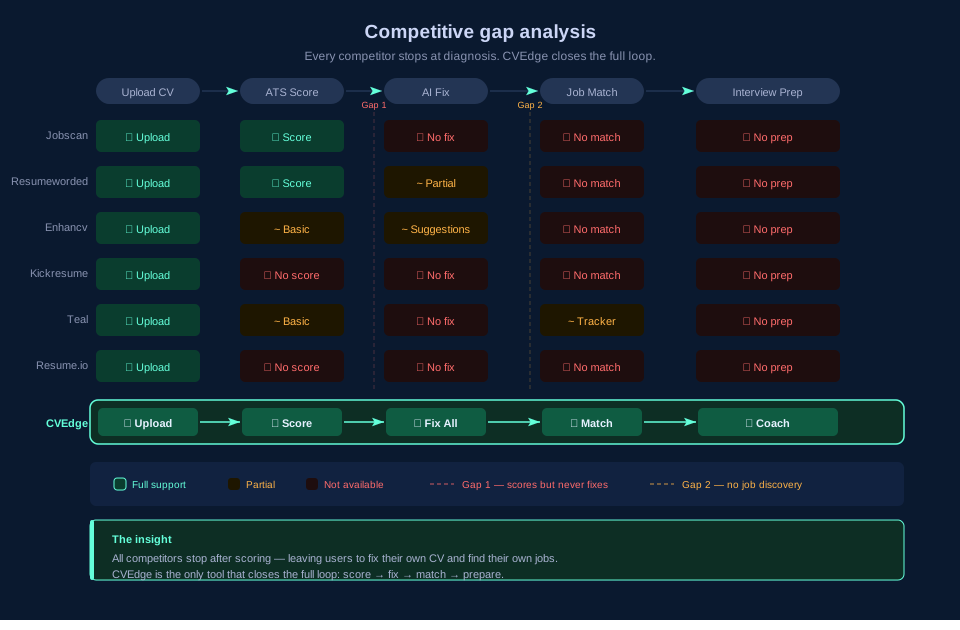
Every existing tool either charges users, does only one thing, or is too technical for non-expert job seekers. None close the loop from CV → job match → interview prep.
Research & Discovery
Four research streams ran before designing a single screen.
Method 1: Job Seeker Survey (80+ responses)
Structured survey targeting active job seekers in US, UK, and India. Focused on ATS awareness, tool usage, and where the process broke down.
Top 5 job seeker pain points
Survey of 80+ active job seekers — US, UK, India
ATS awareness gap
Most job seekers have no idea ATS software is filtering them out
No feedback loop
Rejected candidates receive no explanation — they repeat the same mistakes
Interview prep disconnect
No tool connects CV optimisation to interview preparation in one flow
Tool cost barrier
Existing ATS tools cost $19–$29/month — unaffordable while unemployed
Repetitive manual process
Job seekers manually rewrite and reformat their CV for every role they apply to
% of respondents reporting this as a significant pain point · n=80+ active job seekers
Top Pain Points
- 83% — Didn't know ATS was filtering their applications
- 71% — Found existing tools too expensive during job search
- 67% — Rewrote their CV manually for each role
- 59% — No way to know if their CV matched a specific JD
- 74% — Felt unprepared for behavioral interview questions
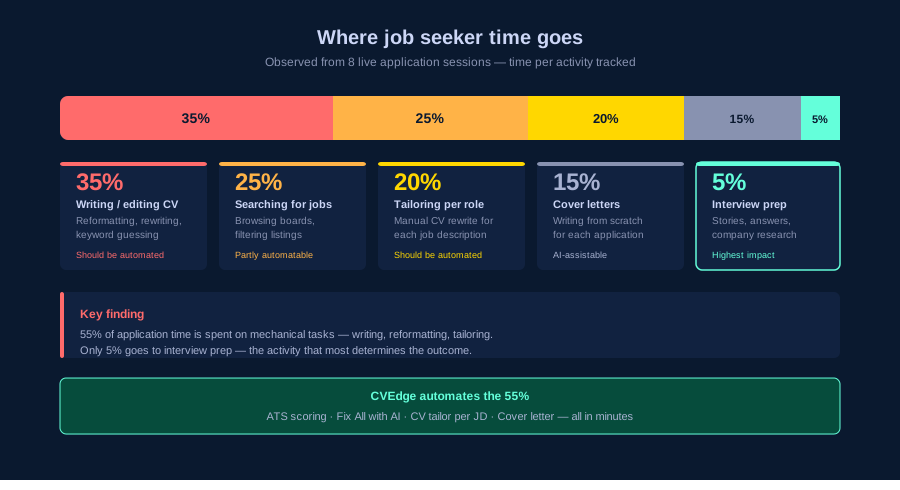
Method 2: Application Session Observation (8 participants)
Observed real job application sessions over video call. Timed each activity and noted friction points.
Method 3: Deep-Dive Interviews (20 job seekers)
Qualitative interviews across experience levels — fresh graduates, mid-level professionals, senior candidates.
"I applied to 40 companies and heard back from 2. I thought my experience wasn't good enough. Nobody told me my CV was being filtered before anyone read it."
— Mid-level Software Engineer, UK
"I pay $29/month for Jobscan but I'm not working right now. It feels wrong to spend that much when I'm trying to find a job."
— Product Manager, USA
"I know my CV needs work but I don't know what to fix. I need someone to tell me exactly what's wrong — and then fix it for me."
— UX Designer, Canada
Method 4: Competitive Teardown (12 tools)
Deep evaluation of every major CV and ATS tool — as a real job seeker would experience them.
Design Process
Phase 1: Product Architecture
Research revealed four distinct mental modes a job seeker operates in. The product needed to support all four without conflating them.
1. CV Builder
Create and edit the CV. All sections, all templates, design controls. The foundational layer everything else builds on.
2. ATS Analyser
Score the CV across 6 categories, surface missing keywords, fix everything with one click. Closes the loop from diagnosis to fix.
3. Job Match Engine
Paste any job description. See your match score, gaps, and JD red flags. Tailor your CV for that specific role with one click.
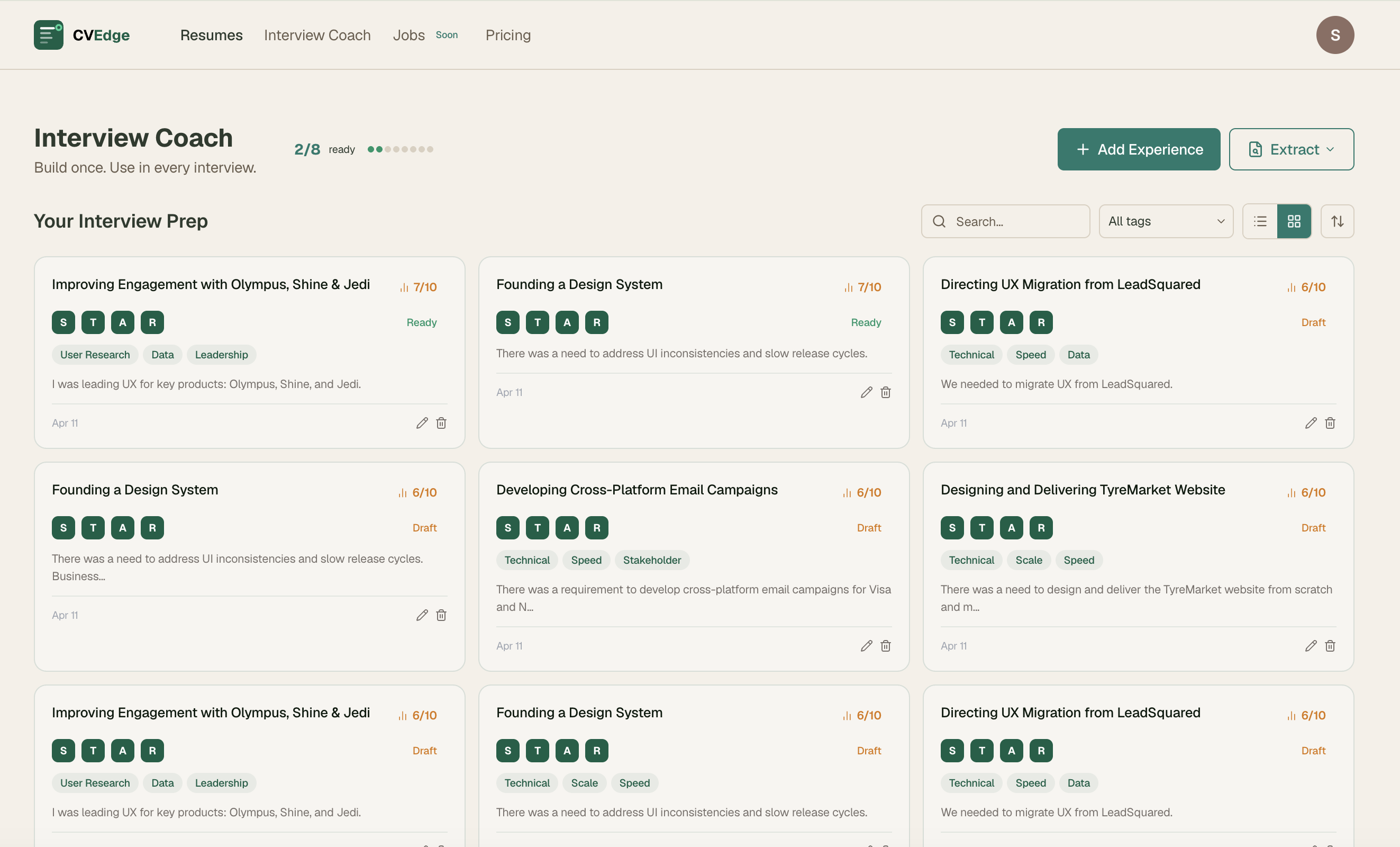
4. Interview Coach
Build a personal library of career stories in STAR format. Before any interview, surface the most relevant stories for that role.
Why four separate modes?
Grading a CV needs focus. Matching a job needs comparison. Preparing for an interview needs recall. Forcing them into one view creates the exact cognitive overload job seekers are trying to escape.
Phase 2: ATS Score — Designing for Trust
The ATS score is the core value proposition. Getting the design right required solving a fundamental trust problem: job seekers need to believe the score is meaningful, actionable, and honest — not a black box number.
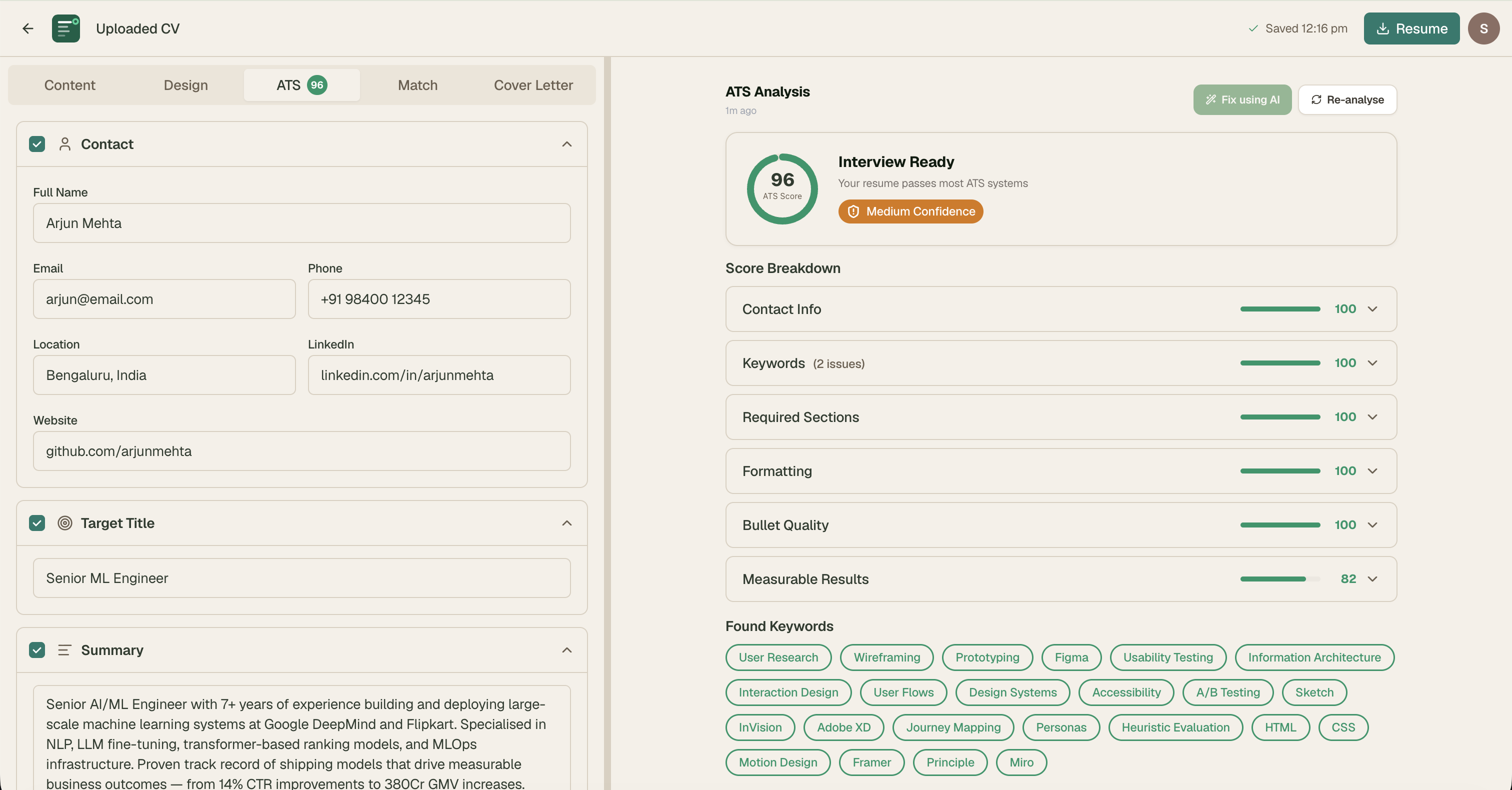
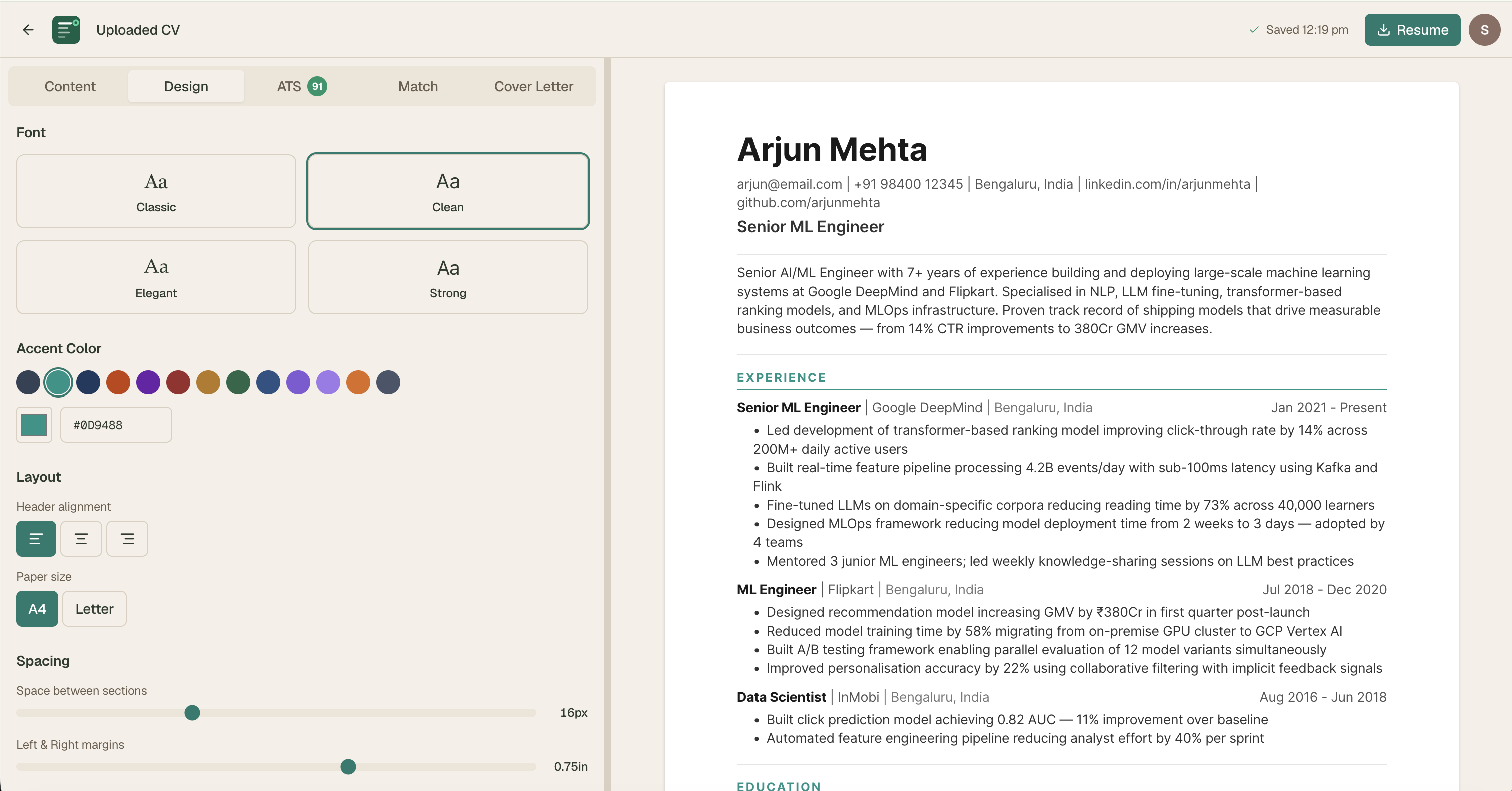
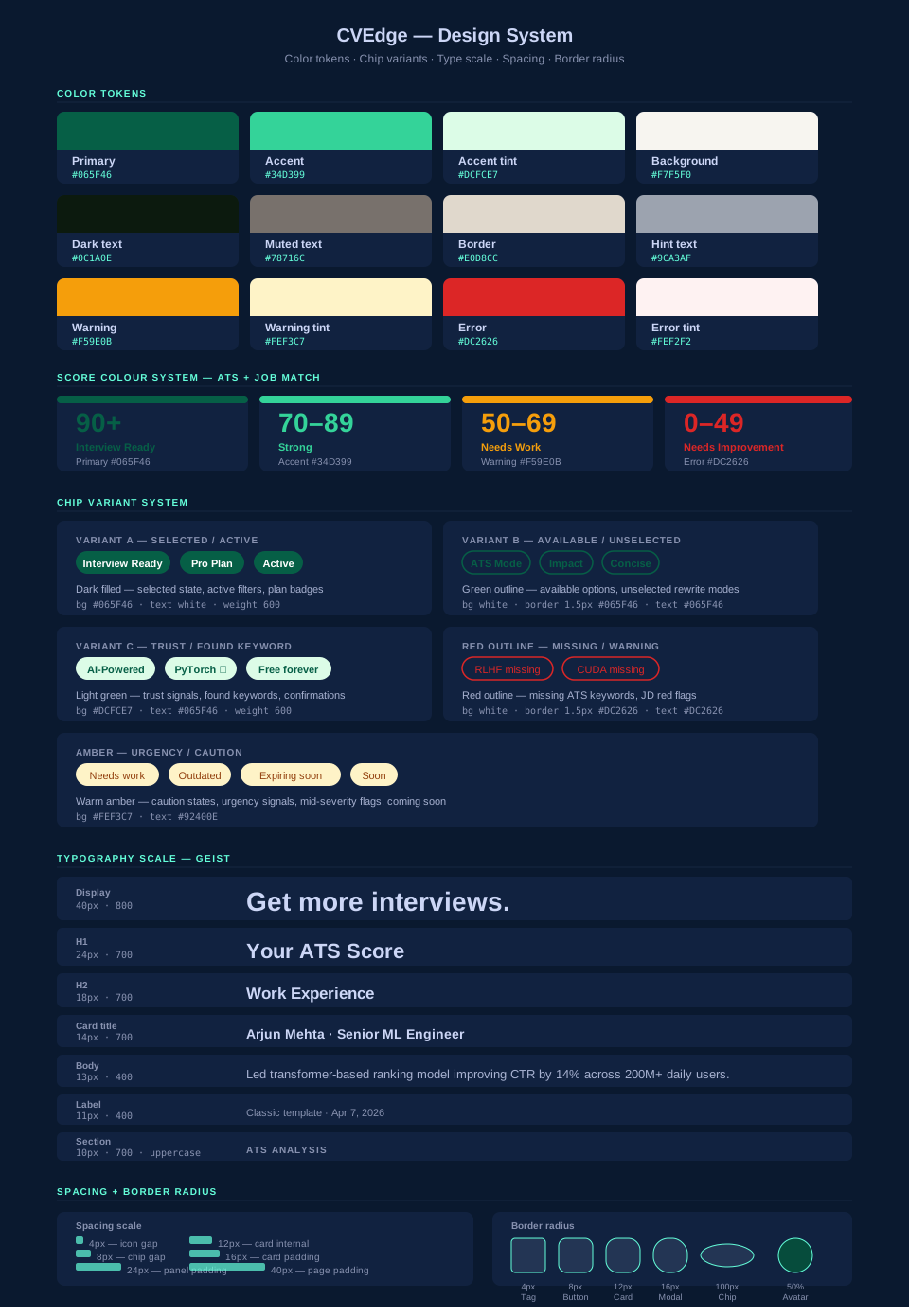
Score Color System
| Score | Color | Status | Primary CTA |
|---|---|---|---|
| 90–100 | Forest green | Interview Ready | Download PDF |
| 70–89 | Emerald | Strong | Re-analyse |
| 50–69 | Amber | Needs Work | Fix All with AI |
| Below 50 | Red | Needs Improvement | Fix All with AI |
Real-time Estimated Score
The full ATS analysis is AI-powered and takes 3–5 seconds. We also run a client-side keyword scan in real time — users see their score update as they type. This creates immediate feedback that makes editing feel responsive and motivating.
Phase 3: Fix All with AI — Designing Human-in-the-Loop
The most complex design challenge. AI rewrites the user's CV automatically — powerful but inherently risky. Users need control over their own career narrative.
Attempt 1: Auto-apply all changes silently
AI rewrote and applied all changes without review. Users felt like they'd lost their voice. "This doesn't sound like me" was the dominant reaction in testing.
Attempt 2: Modal with a list of proposed changes
Showed changes in a modal. Users couldn't assess quality without before/after side by side. Most clicked "Accept All" without reviewing — defeating the purpose entirely.
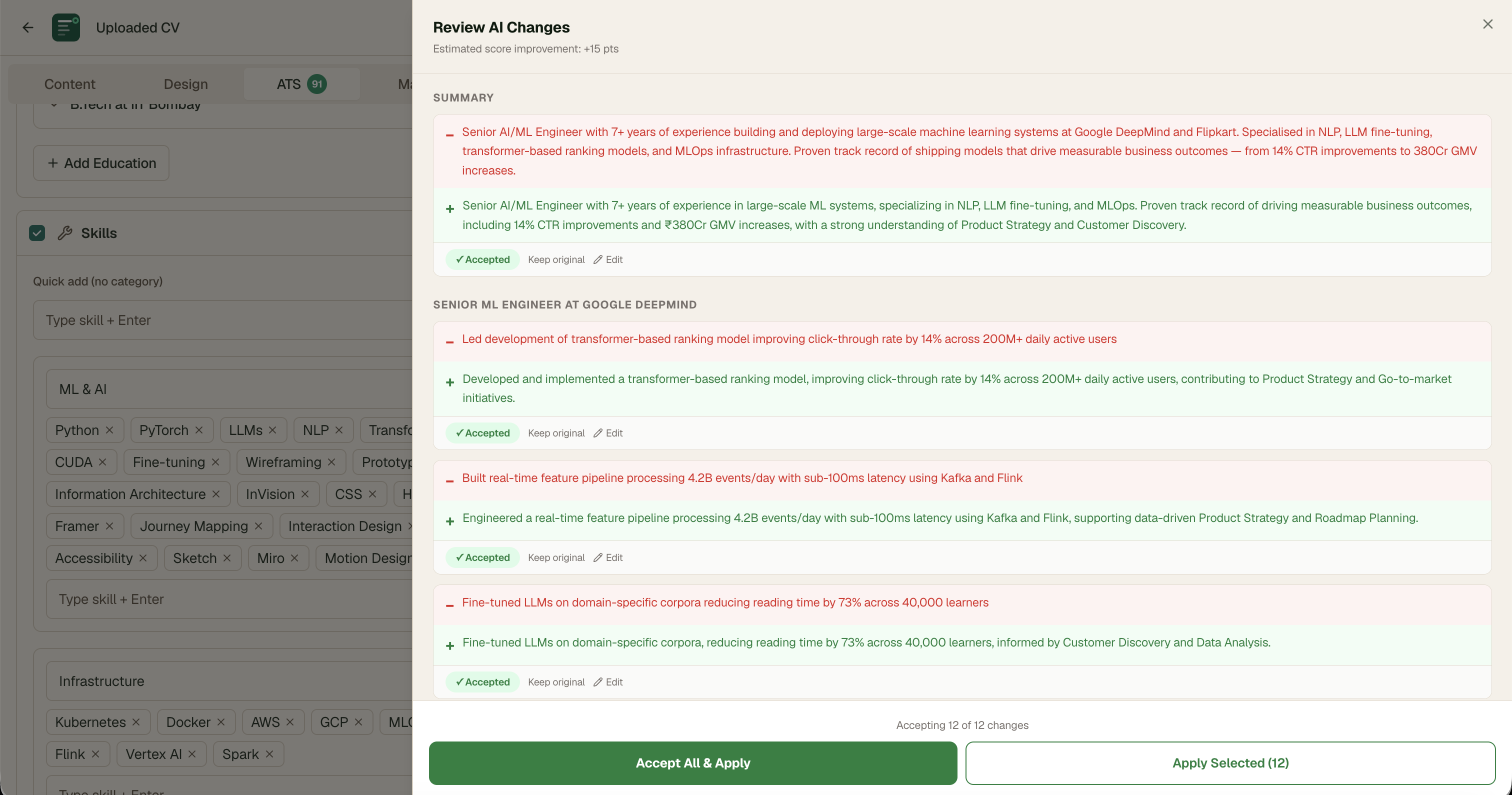
Final: GitHub-style git diff drawer
Red line shows original. Green line shows rewrite. User accepts, rejects, or edits each change individually. Live estimated score updates as user makes selections. After accepting — auto re-analyses ATS and re-runs job match so both scores reflect the changes immediately.
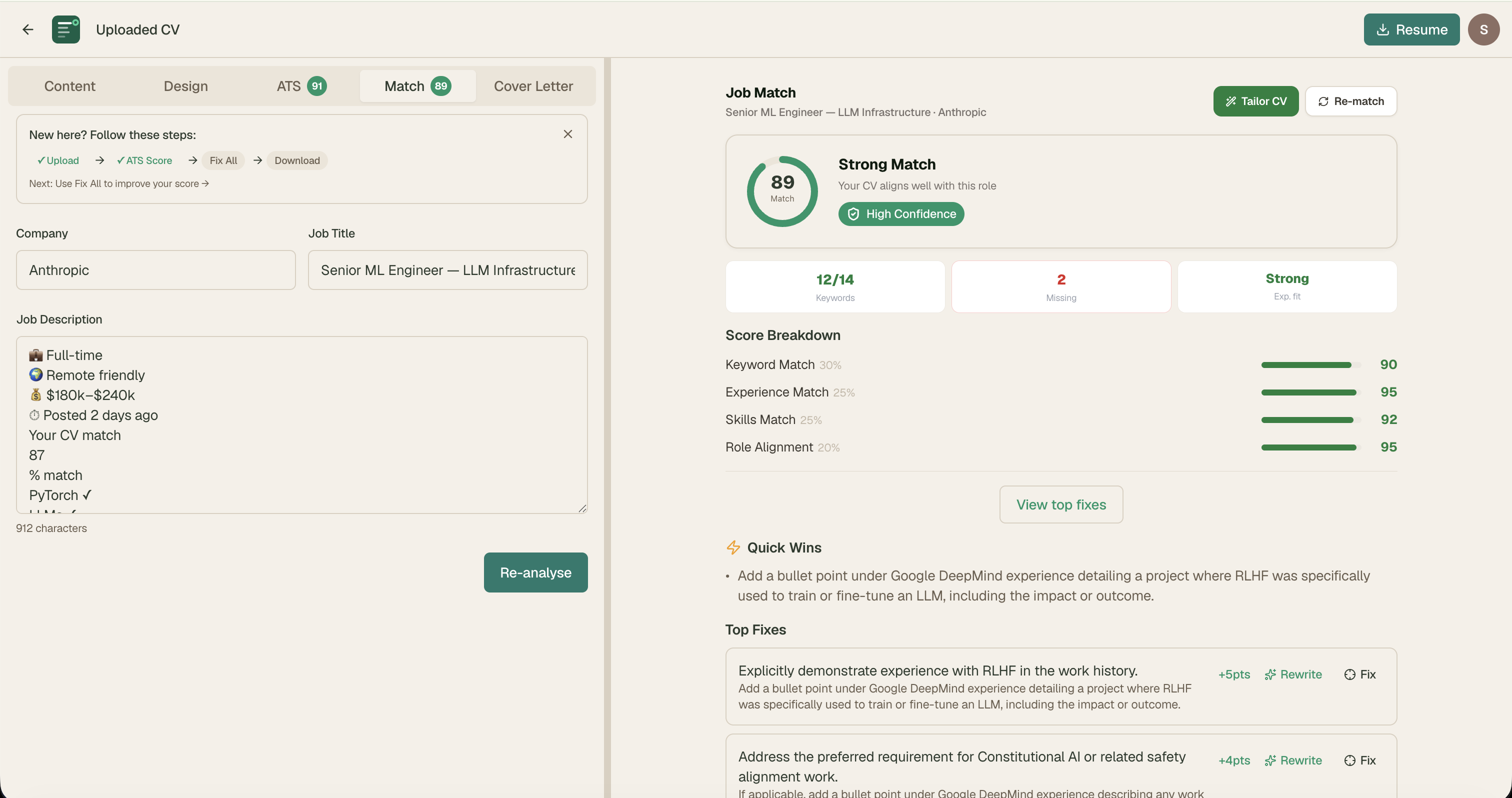
Phase 4: Job Match Engine
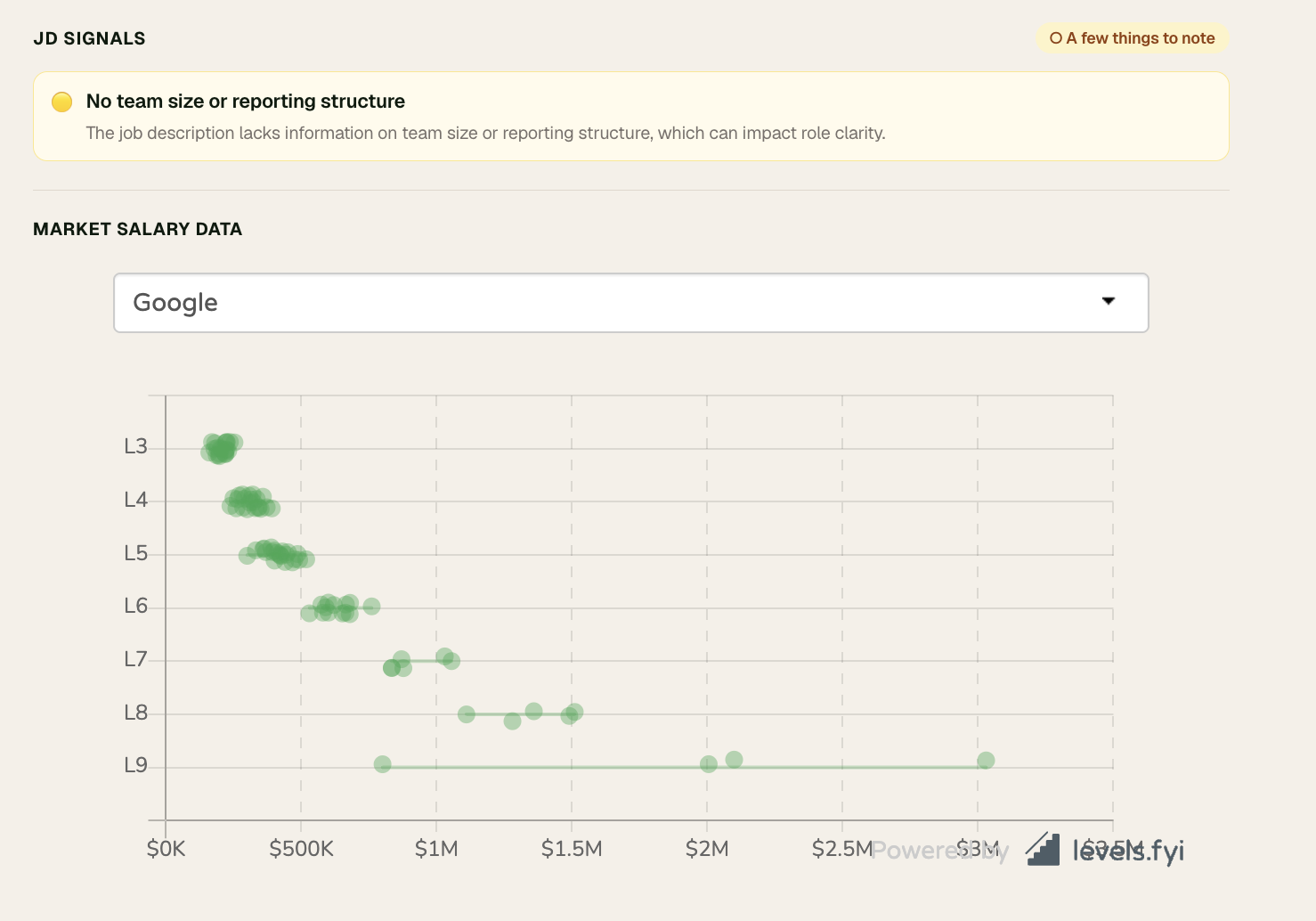
The job match panel needed to answer three questions simultaneously: How well do I match this role? Why don't I match better? What should I do about it?
JD Red Flag Detector
Users were applying to jobs without realising the JD itself had warning signs. The detector flags high-confidence issues only — avoiding false positives that would erode trust.
Flagged signals
- Role title contradicts experience requirement (Red)
- Unreasonable availability demands — "must be available 24/7" (Red)
- No essential benefits mentioned — insurance, transport for night shifts (Yellow)
- "Wear many hats" or "scrappy team" without substance (Yellow)
- Vague responsibilities with no core duties listed (Yellow)
Not flagged
- Missing salary range — could mean open/negotiable
- Contract roles — candidate may prefer
- Long probation — norms vary by country
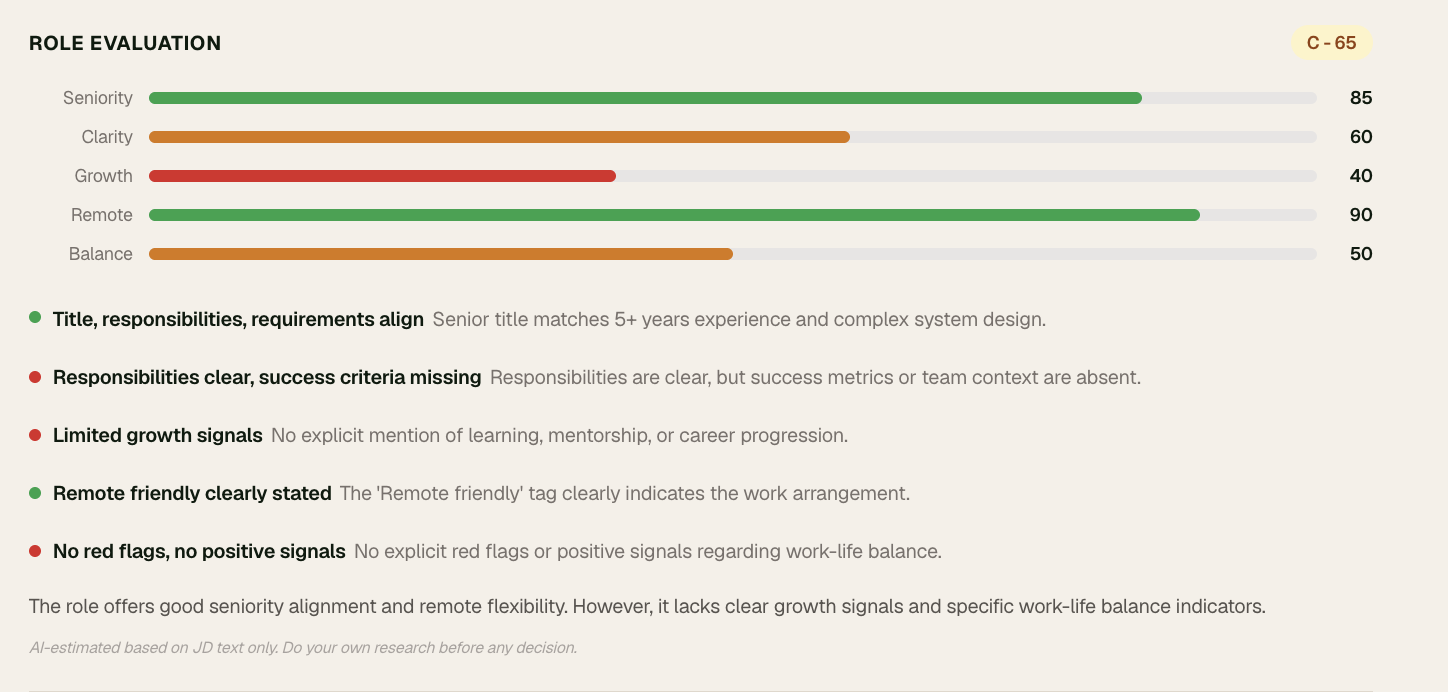
Offer Evaluation Score
Scores the JOB not the candidate across 5 dimensions: seniority fit, role clarity, growth signals, remote/onsite clarity, work-life balance. Radar chart + signal rows. Always shows: "AI-estimated. Do your own research before any decision."
Phase 5: Interview Coach
Story Sources
Users build their story library from multiple sources:
- CV bullets — AI pre-fills STAR from existing bullets, user fills gaps
- Portfolio URL — AI reads case studies, extracts stories
- GitHub README — AI reads project descriptions, finds technical stories
- Any URL or PDF — Blog posts, project reports, any document
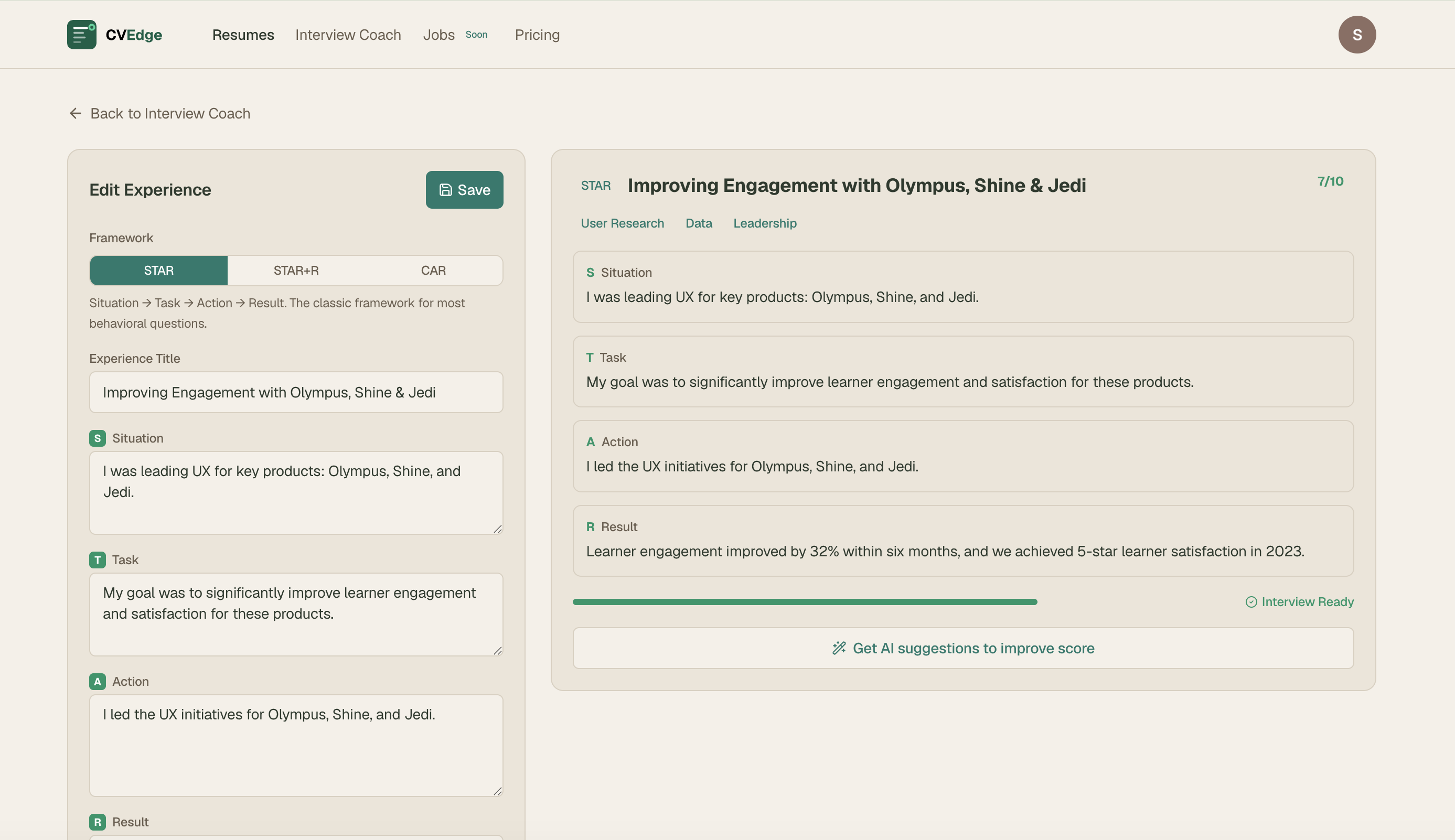
STAR + Reflection + Summary
Each story has: Situation → Task → Action → Result → optional Reflection. After completing all fields, user clicks "Generate story summary" — AI writes a 2–3 sentence natural narrative they can read before walking into the interview.
Interview Prep Mode
User pastes a JD before any interview. CVEdge surfaces top 5 relevant stories ranked by relevance, with suggested behavioral questions each story answers and a suggested opening line for each answer.
Phase 6: Design System
With a product this complex — CV editor, ATS panel, job match, cover letter, interview coach, dashboard, admin panel — a robust design system was essential.
Prompt Engineering — The Real Design Work
The quality of what got built was entirely determined by the quality of my prompts. Prompt writing became a design discipline in itself.
My Prompt Architecture
Every Claude Code prompt followed a strict structure:
Why this structure:
- Reference CONTEXT.md — injects full product context so Claude Code never conflicts with existing patterns
- File path first — Claude Code always knows exactly what to touch
- Numbered parts — separates concerns, prevents instruction drift
- Exact values — eliminates interpretation errors
- "Share screenshot when done" — forces visual verification, not just code output
CONTEXT.md — The Design System as Machine-Readable Document
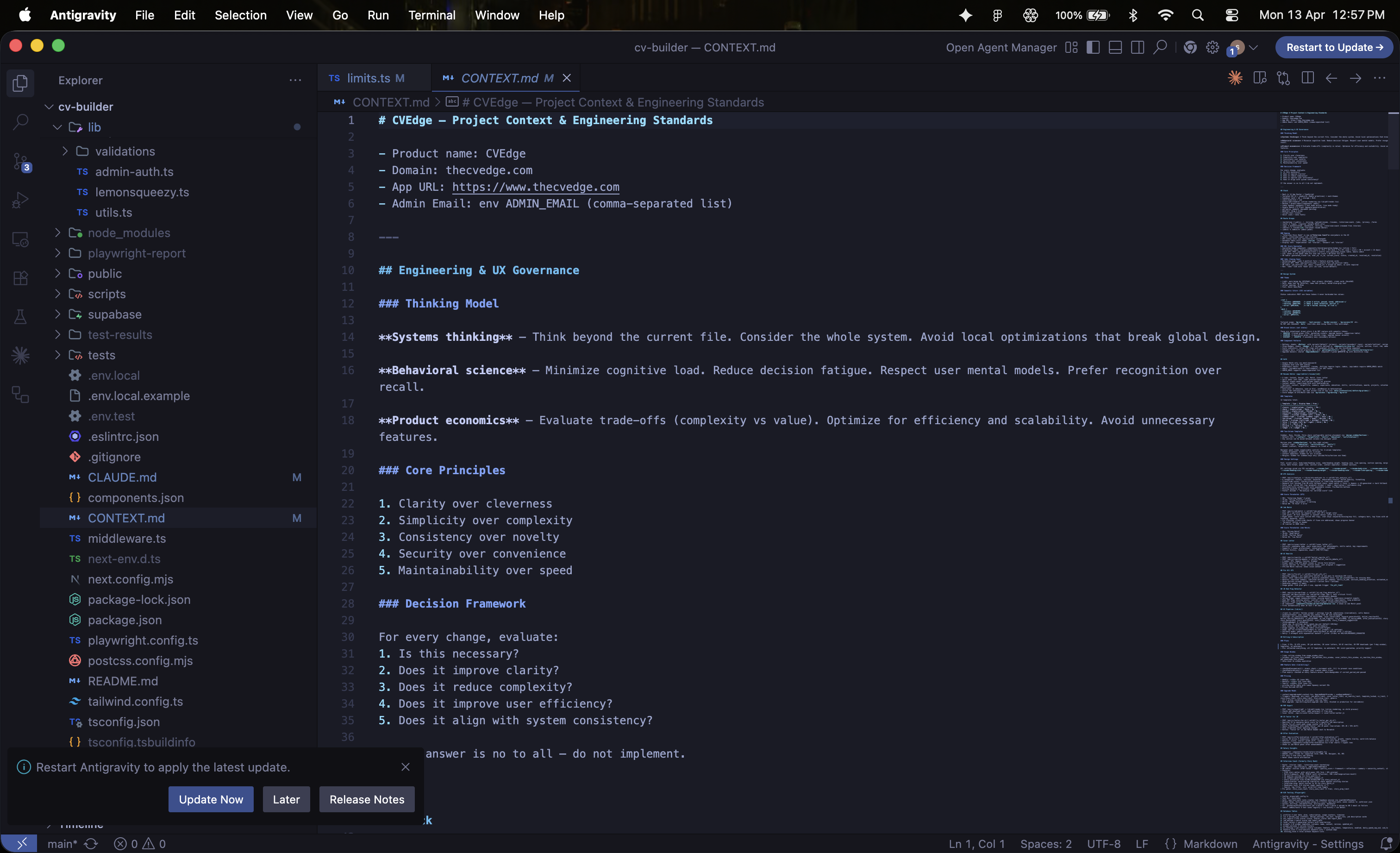
The most important design decision of the entire project was creating CONTEXT.md — a single source of truth that every Claude Code prompt references. It contains the complete color system, chip variant system, typography conventions, component patterns, business logic, and explicit anti-patterns.
Without this, every prompt rebuilds context from scratch and drifts from the design system. With it, 50+ prompts over 6 months maintained visual and interaction consistency across the entire product.
Multi-Agent Prompting
For complex features I ran multiple Claude Code agents in parallel — each owning a specific concern:
Running agents in parallel compressed what would have been a multi-day feature into a single session.
The Prompts I Designed
Each prompt was designed as a product specification — not just an instruction. Output format, edge case handling, and failure modes were all specified explicitly.
ATS Analysis Prompt — Key Design Decisions
The initial ATS prompt penalised older experience and required specific formats that were unnecessarily restrictive. Iterating the prompt — not the code — fixed scoring accuracy instantly.
Fix All Prompt — The Hardest Prompt to Write
Getting the Fix All prompt right took 6 iterations. The core challenge: an AI that is too aggressive rewrites everything and loses the user's voice. An AI that is too conservative doesn't help. The prompt constraints are the design work.
Story Extraction Prompt — Seniority-Aware
A prompt that generates the same output regardless of career stage creates poor experiences at both ends. Seniority detection inside the prompt means the AI adapts without any conditional logic in the application code.
Technical Integrations
These were not built for me — I designed, specified, and directed every integration through prompts.
Supabase — Database Architecture
Key schema decisions:
- red_flags jsonb and offer_evaluation jsonb on job_match_results — AI output stored with the analysis, not in separate tables
- prompts table separate from application code — enables prompt iteration without deploys
- fix_all_count_week and fix_all_window_start on profiles — rolling 7-day window, not calendar week
- RLS on all user tables — users can only access their own data
Gemini 2.5 Flash — AI Integration
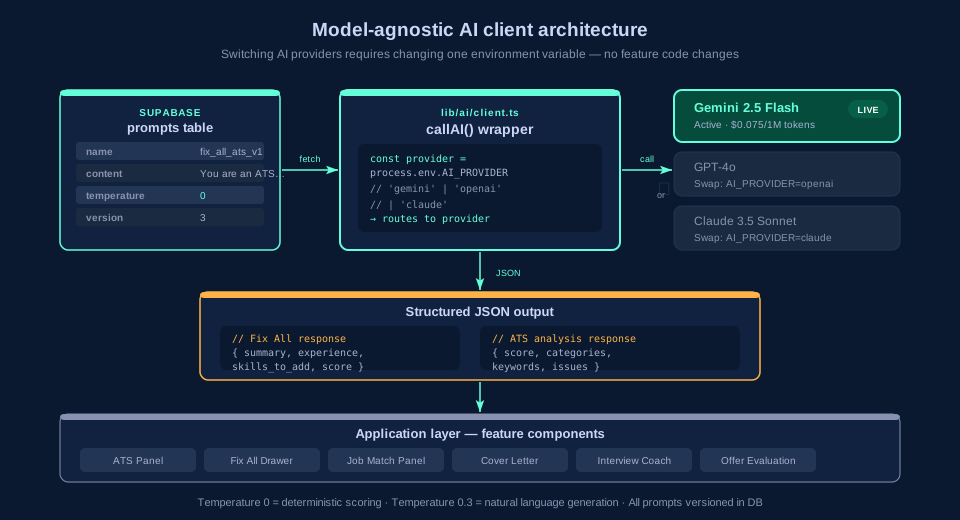
The AI client is model-agnostic. Switching from Gemini to GPT-4o or Claude requires changing one environment variable. No vendor lock-in at the AI layer.
Token cost analysis:
| Action | Tokens | Cost |
|---|---|---|
| ATS analysis | ~3,000 | $0.0003 |
| Fix All — full CV | ~10,000 | $0.001 |
| Portfolio scanning | ~20,000 | $0.002 |
| Heaviest power user/week | ~176,500 | $0.013 |
At Gemini Flash pricing a free-forever model is financially viable — a design insight that changed the entire product strategy.
Playwright E2E Testing — Infrastructure I Designed
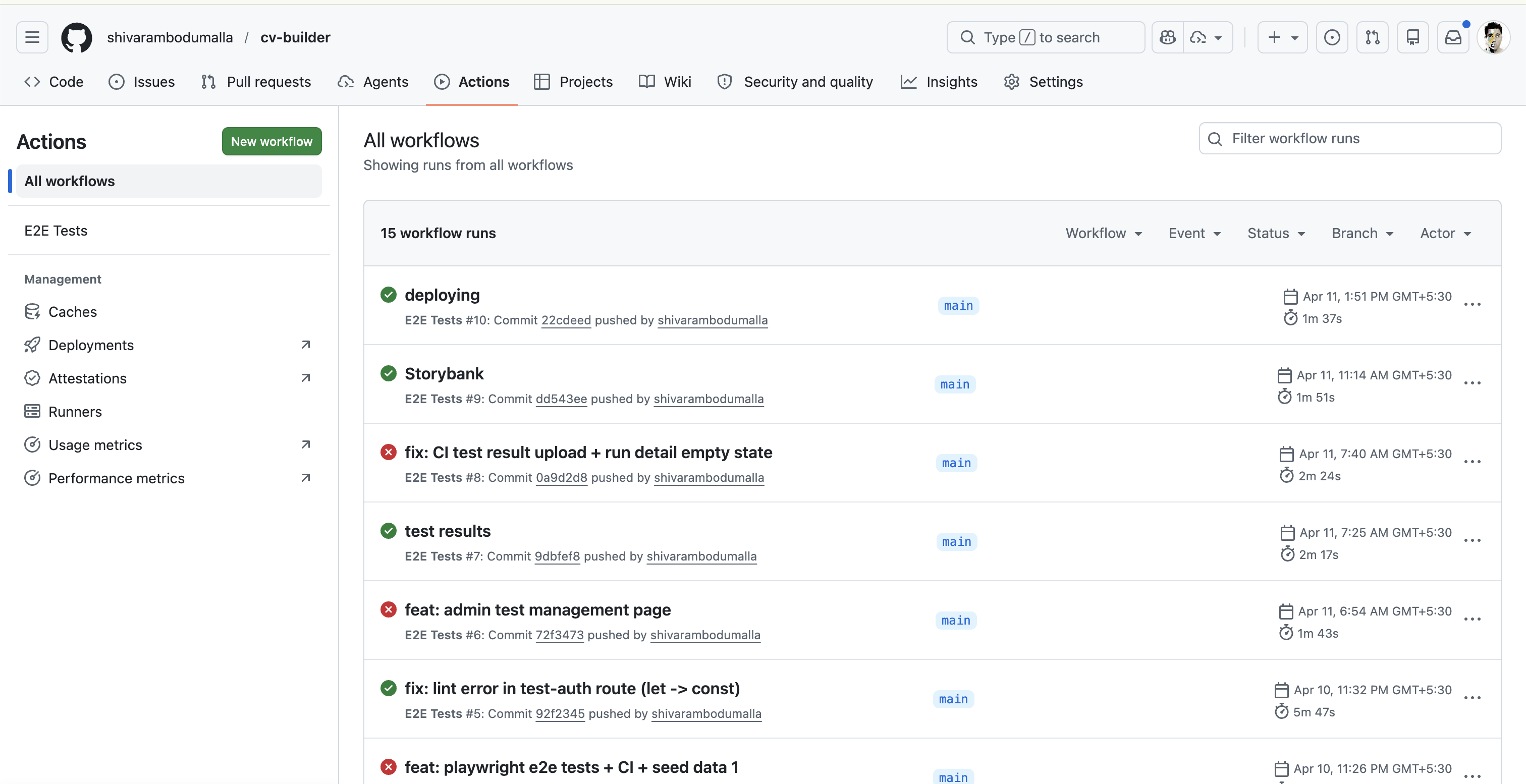
Getting Playwright to work with Google OAuth was a significant problem. Three approaches, one solution:
Approach 1: Header bypass
Supabase middleware runs before custom middleware.
Approach 2: Magic link
Redirect chain didn't complete in headless browser.
Approach 3: API route test-auth
Created a development-only route that creates a real Supabase session, sets cookies in the correct chunked format, saves storageState for all subsequent tests.
6 tests, all green, running on every push to main via GitHub Actions.
Admin Test Management — Designed Like Vercel Deployments
The admin test page UX pattern came from Vercel's deployment history — because that's the mental model that made most sense. Every push to main is a deployment. Every deployment should have a quality signal attached to it.
Maintainability & Admin
Most side projects are built to ship — not to maintain. CVEdge was built as if a team would inherit it.
The Admin Panel — Operating the Product Without Code
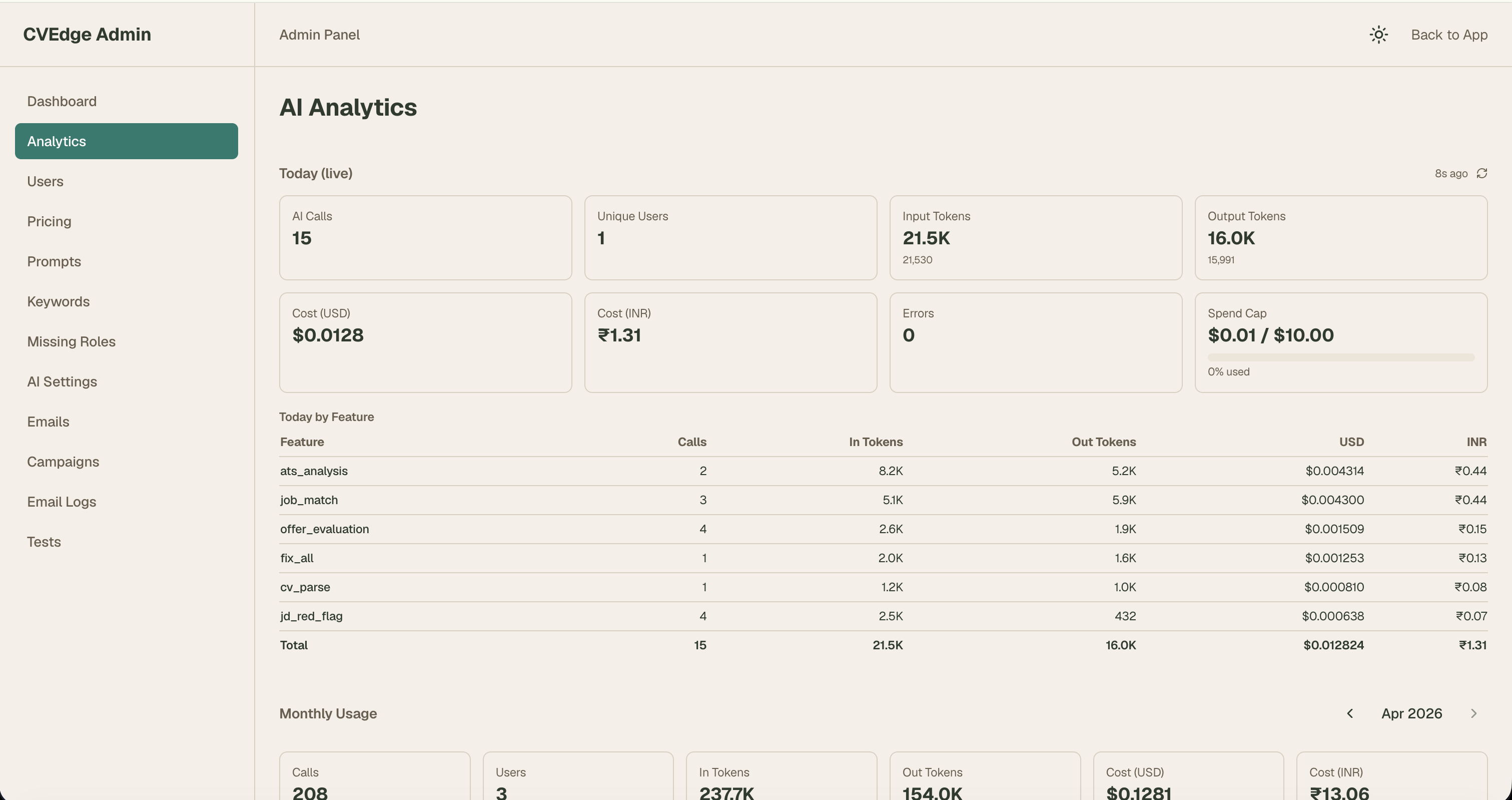
The admin panel is the operational layer that makes the product maintainable without touching code.
What I can change without a single code deploy:
| Admin section | What it controls | Why it matters |
|---|---|---|
| Prompts | All AI prompt content and temperature | Iterate AI behaviour without code changes |
| AI Settings | Max tokens, feature flags per AI action | Cost and quality control per feature |
| Keywords | ATS keyword library by role | Improve scoring accuracy over time |
| Missing Roles | Roles CVEdge doesn't recognise | Fix blind spots as new job titles emerge |
| Pricing | Subscription tiers and token pack prices | Change pricing without a deploy |
| Emails | All email template HTML | Fix or improve any email without code |
| Campaigns | Drip email sequences | Create new sequences without code |
| Users | View, search, manage accounts | Support without database access |
| Tests | Test case management, run history | Monitor quality post-deploy |
Prompts as a Database — Not Code
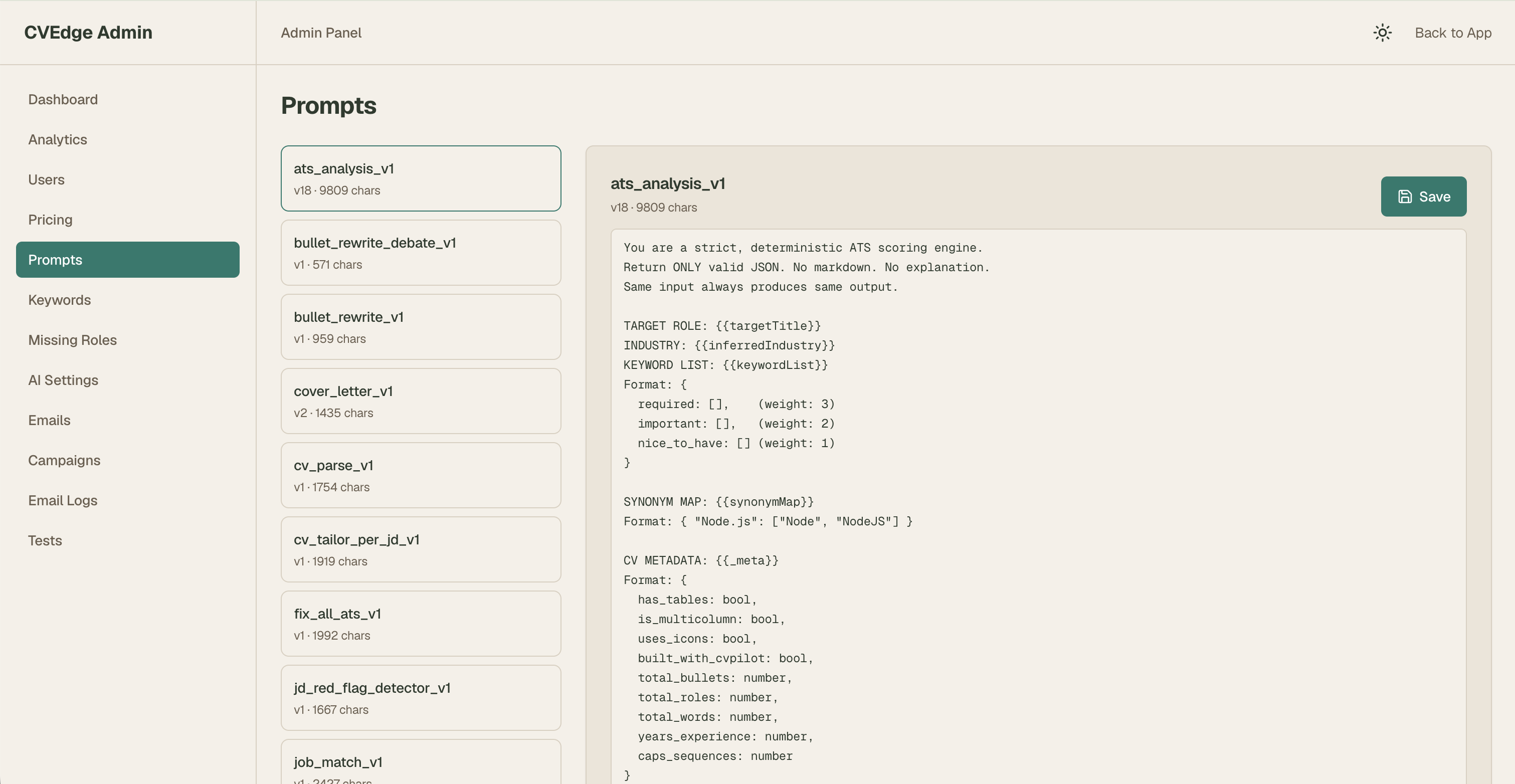
The problem with hardcoded prompts:
The prompts table approach:
Every AI behaviour is editable from the admin panel in 30 seconds. When Fix All was generating too-aggressive rewrites during testing, I fixed the prompt mid-session — without stopping, committing, or deploying anything.
Each prompt has a version integer. Full rollback available instantly.
Ten Autonomous Design Decisions
These weren't requested features — they were product design choices made independently, each reflecting a deliberate philosophy.
1. Model-agnostic AI layer
Built a wrapper that abstracts the AI provider. Switching models requires changing one environment variable. Vendor lock-in at the AI layer is the highest-risk technical decision in an AI product.
2. Rolling 7-day usage window
Usage resets every 7 days from the user's first action — not on Monday. Calendar resets create binge-at-reset behaviour. Rolling windows smooth usage and reduce churn signals.
3. Temperature control per prompt
ATS analysis and Fix All run at temperature 0 (deterministic). Story summary at 0.3 (slight creativity). Offer evaluation at 0 (factual signals only). Temperature is a product decision, not a technical one.
4. JSONB columns for AI output
AI outputs stored as JSONB — not normalised into relational tables. AI output structure evolves. JSONB absorbs schema changes without migrations.
5. Fixed UUIDs for test data
Test user and test CV have fixed hardcoded UUIDs. Dynamic UUIDs in test data create flaky tests. Fixed UUIDs make tests deterministic and seed scripts idempotent.
6. Upgrade modal context system
Any component can trigger the upgrade modal with a trigger type: showUpgrade('fix_all_limit'). Each trigger maps to specific copy and feature list. Without this, upgrade messaging drifts across the product.
7. Admin-seeded test cases
New feature test cases added to the test_cases database table — not just to spec files. Non-engineers can manage test coverage. Future team members don't need to read spec files to understand what's tested.
8. Email templates in database
All 9 email templates stored in email_templates table — not hardcoded. Email copy changes frequently. Admin panel edit takes 30 seconds. Code deploy takes 30 minutes.
9. Guarantee claims table
Built guarantee_claims table and claim flow before the product had a single user. A promise without infrastructure to track and honour it is a trust liability.
10. CONTEXT.md as machine-readable design system
Most design systems live in Figma — inaccessible to the AI building the product. CONTEXT.md is a machine-readable design system that Claude Code reads at the start of every prompt. 50+ prompts over 6 months maintained visual consistency entirely through this file.
Summary — What These Decisions Say
| Decision | What it signals |
|---|---|
| Model-agnostic AI layer | Thinking about vendor risk before it becomes a problem |
| Rolling 7-day usage window | Behavioural design applied to infrastructure |
| Temperature control per prompt | AI quality is a product design concern, not a backend toggle |
| JSONB for AI output | Designing schema for change, not for today's structure |
| Fixed UUIDs for tests | Test reliability is a design decision |
| Upgrade modal context system | Scaling monetisation UX without adding drift |
| Admin-seeded test cases | Making quality assurance accessible to non-engineers |
| Email templates in database | Operational speed matters as much as code quality |
| Guarantee claims table | Trust infrastructure built before it's needed |
| CONTEXT.md as design system | Making design decisions enforceable by AI, not just documented |
Key Features & Design Decisions
1. Resume Card Dashboard
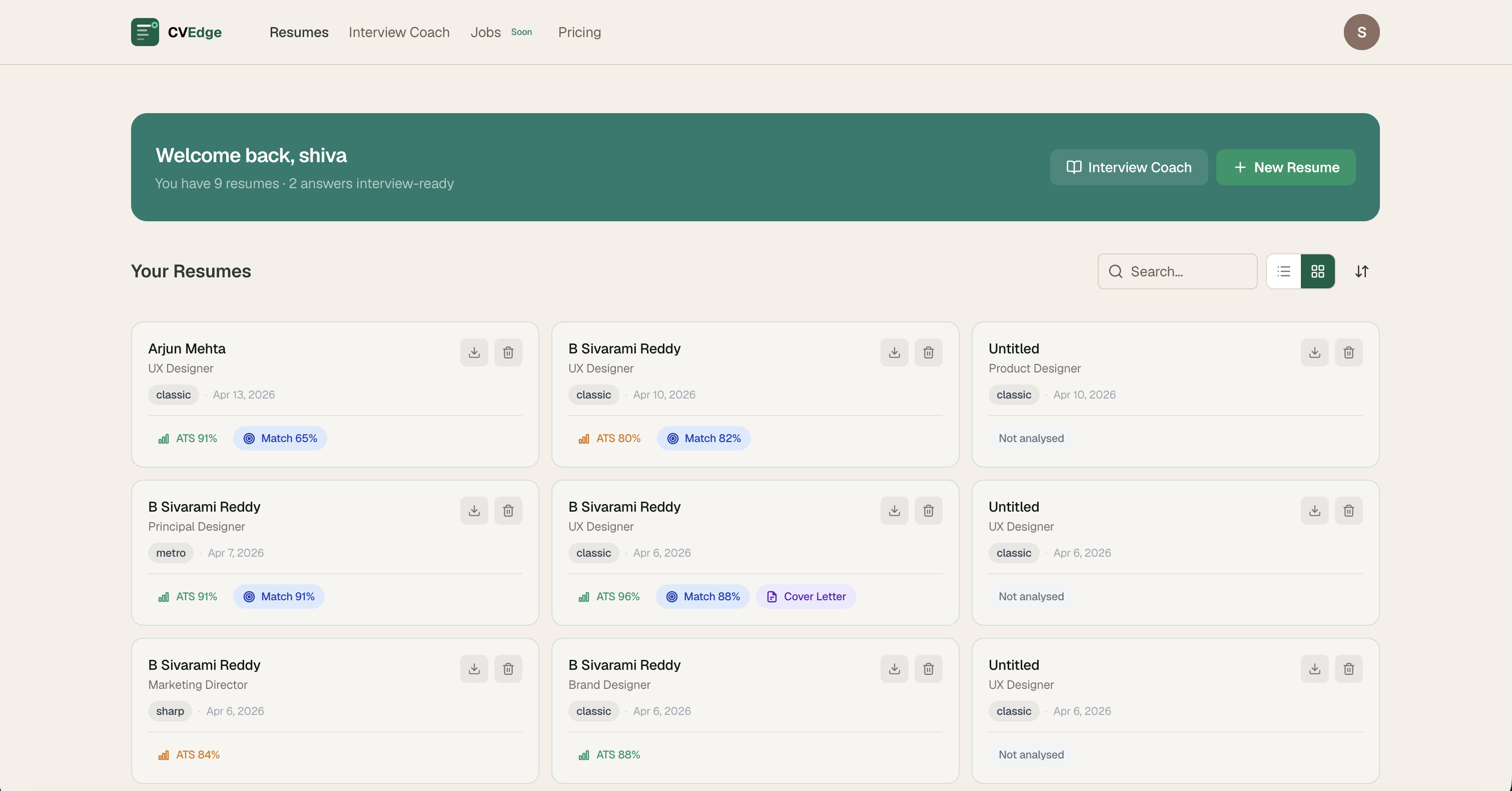
Contact name and job title instead of filename. Template and date on one muted metadata line. ATS score colored by range. Match % in blue, Cover Letter indicator in purple — only shown if completed. Download and delete icons. Entire card clickable.
Impact: Users immediately see which CVs need attention and which are ready — without opening any of them.
2. Template System — 11 Designs
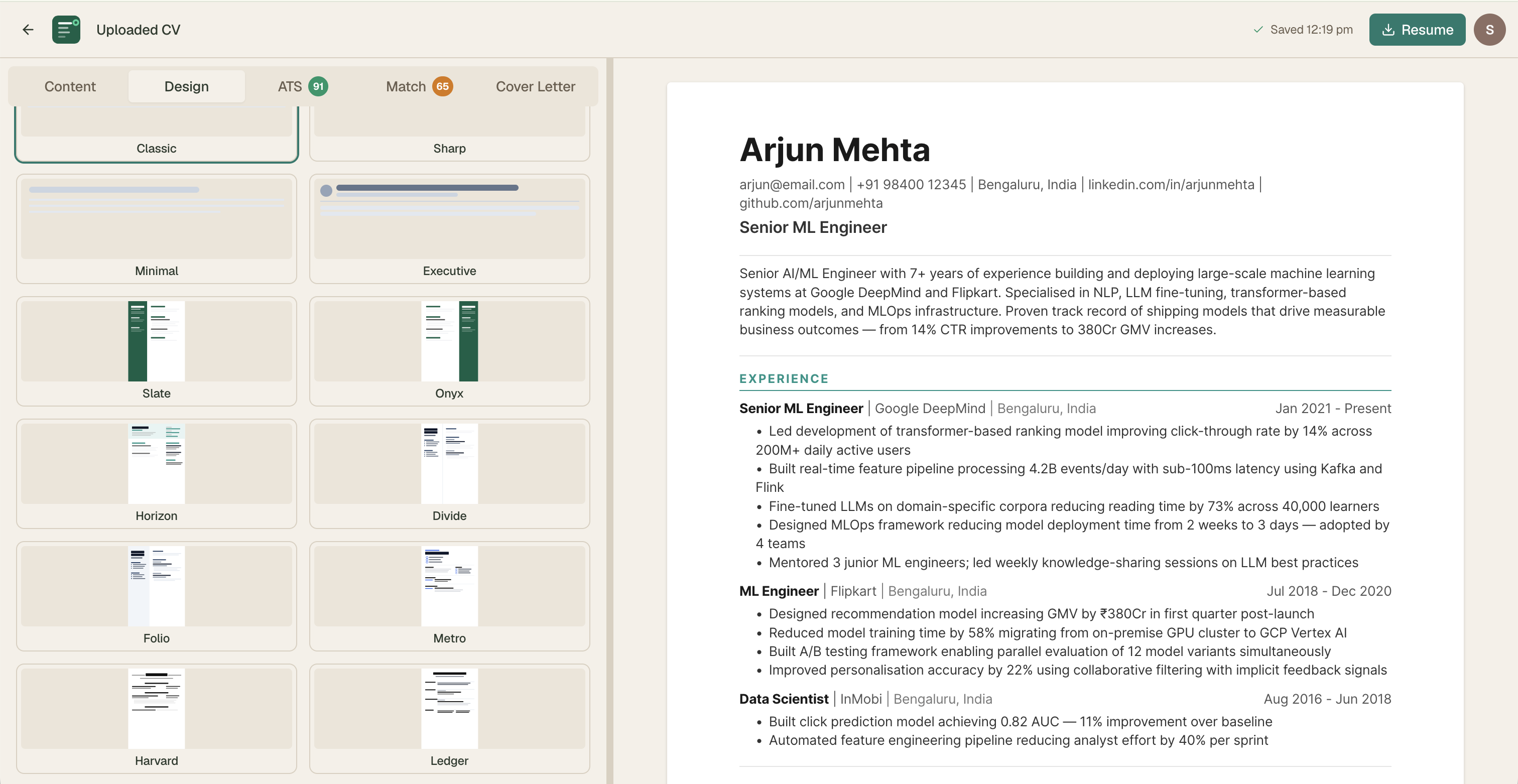
All designed from scratch. Every template tested in both the visual PDF layer and the ATS text extraction layer — a template can look beautiful but fail ATS parsing. Both dimensions tested on every design.
Design constraints across all templates:
- No profile photos — ATS systems can't parse images
- No skill progress bars — decorative and misleading
- No tables for layout — ATS parsers misread table-based layouts
- All respect design settings — font size, spacing, accent color, paper size
3. Semantic Color as Feedback Language
A user who understands what amber means on the ATS score understands it immediately on job match, offer evaluation, and story quality. The color system is the feedback language — it doesn't need labels once learned.
4. What to Remove Is as Important as What to Add
Every prompt included explicit removal instructions:
Most design prompts describe additions. Experienced designers know that removal is often the harder and more valuable decision.
5. Mobile Experience
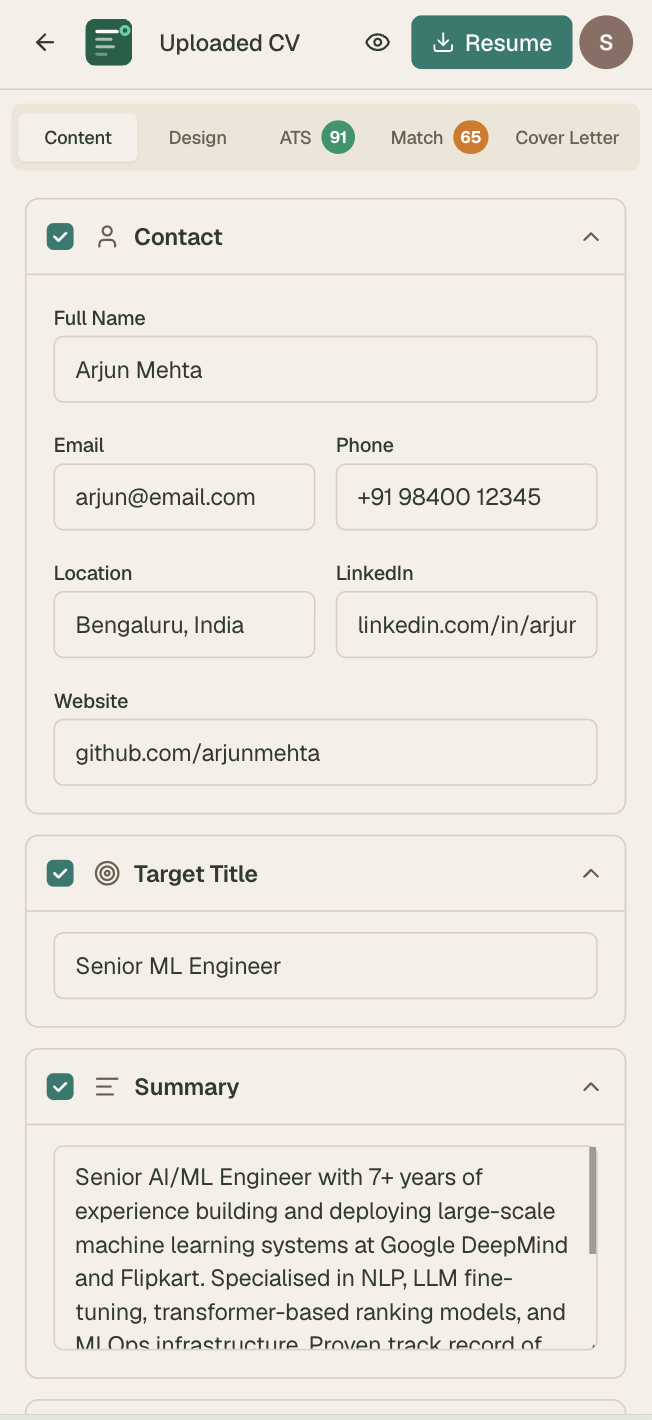
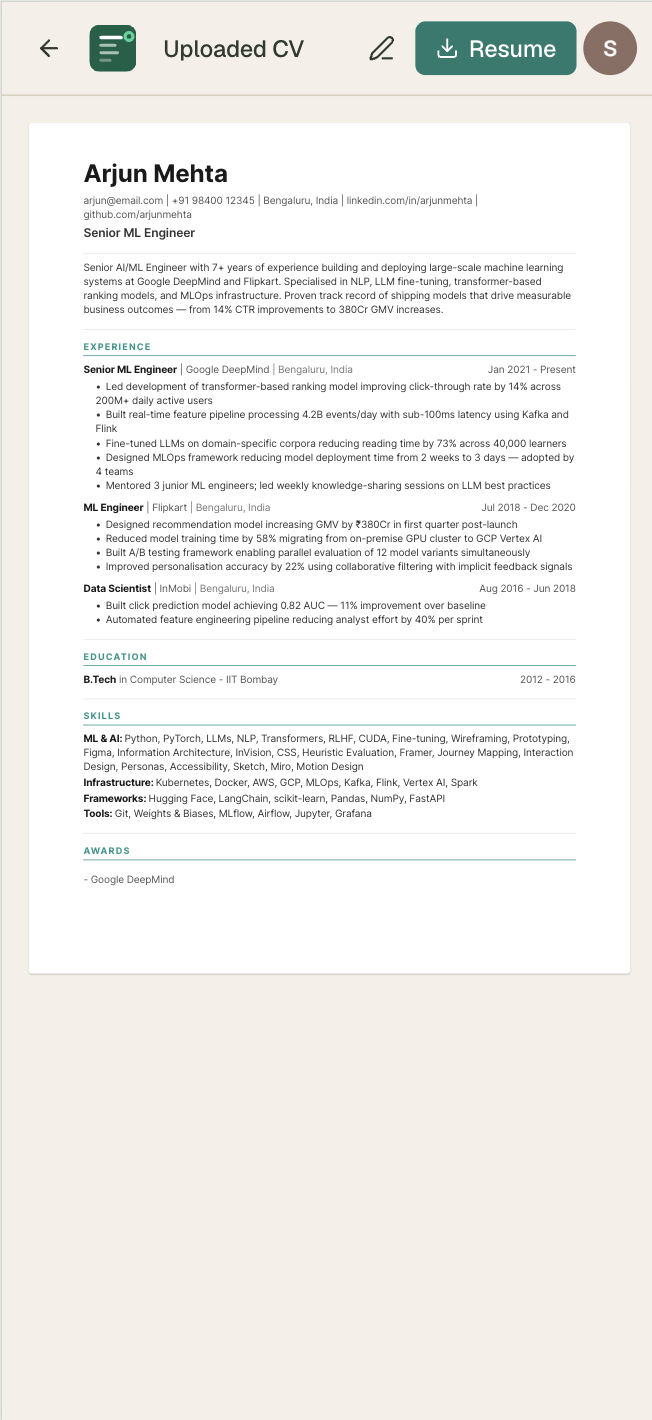
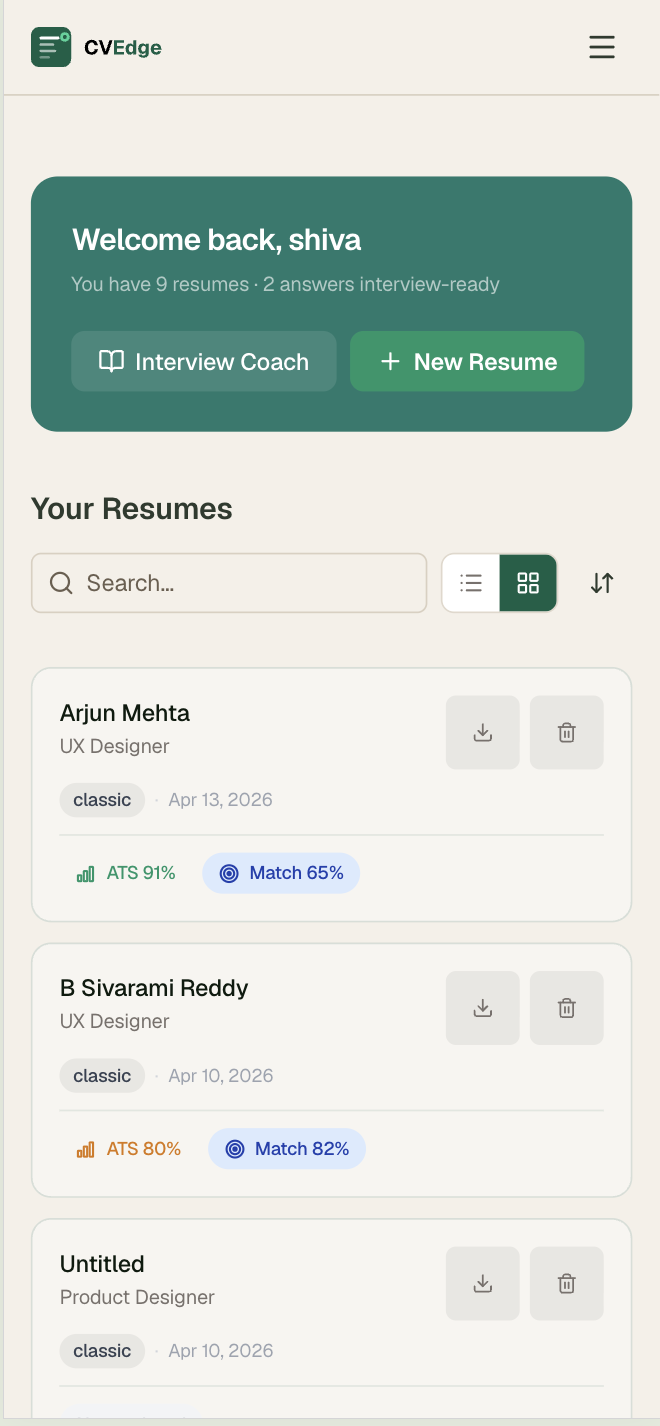
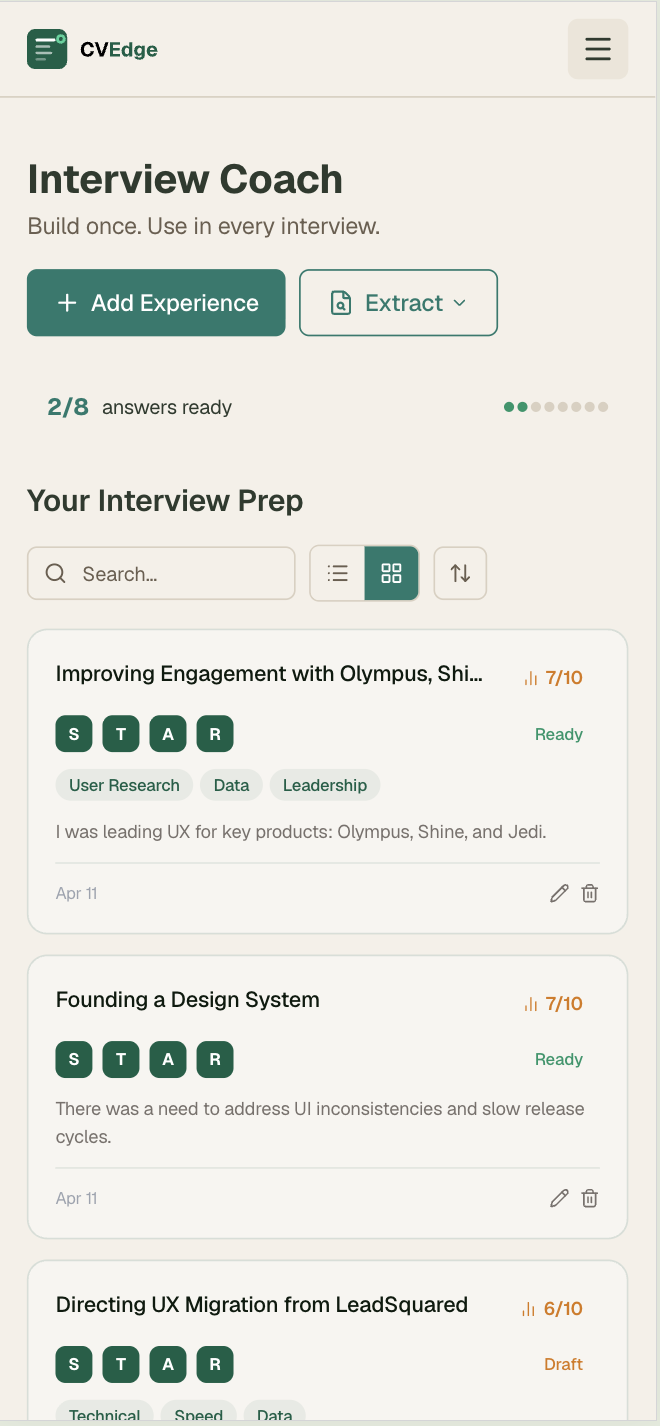
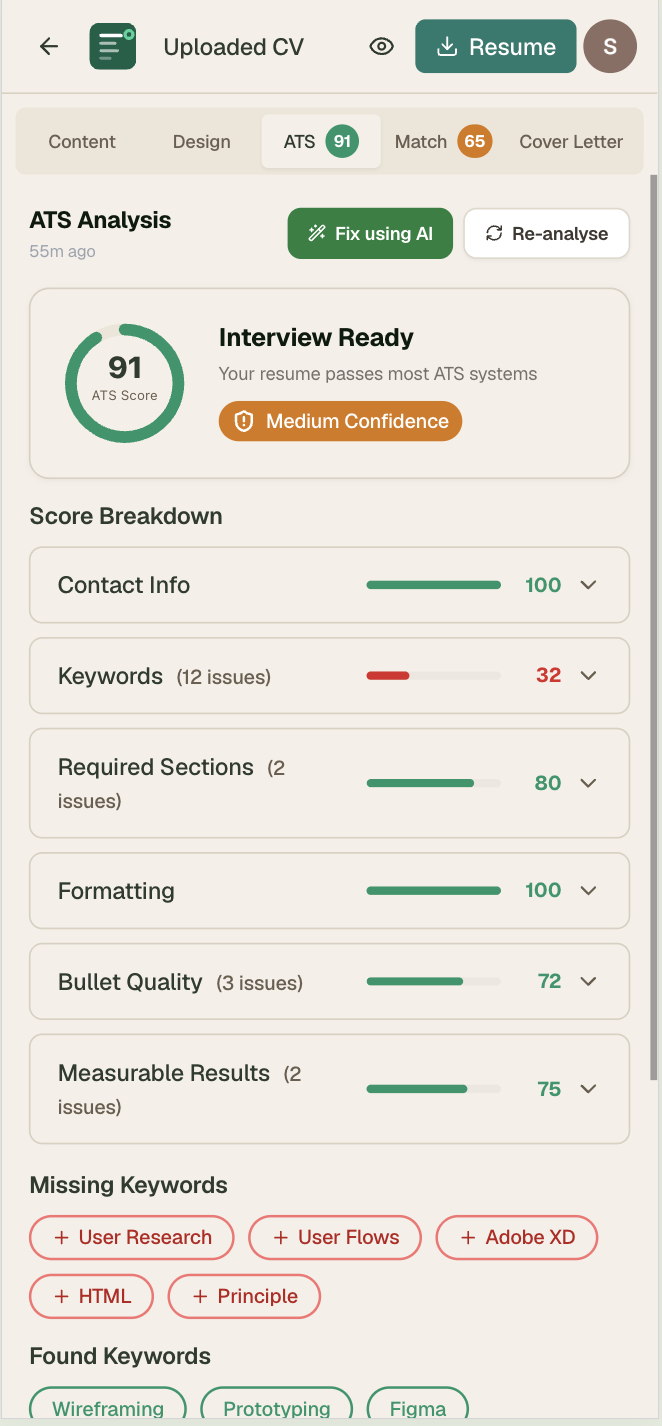
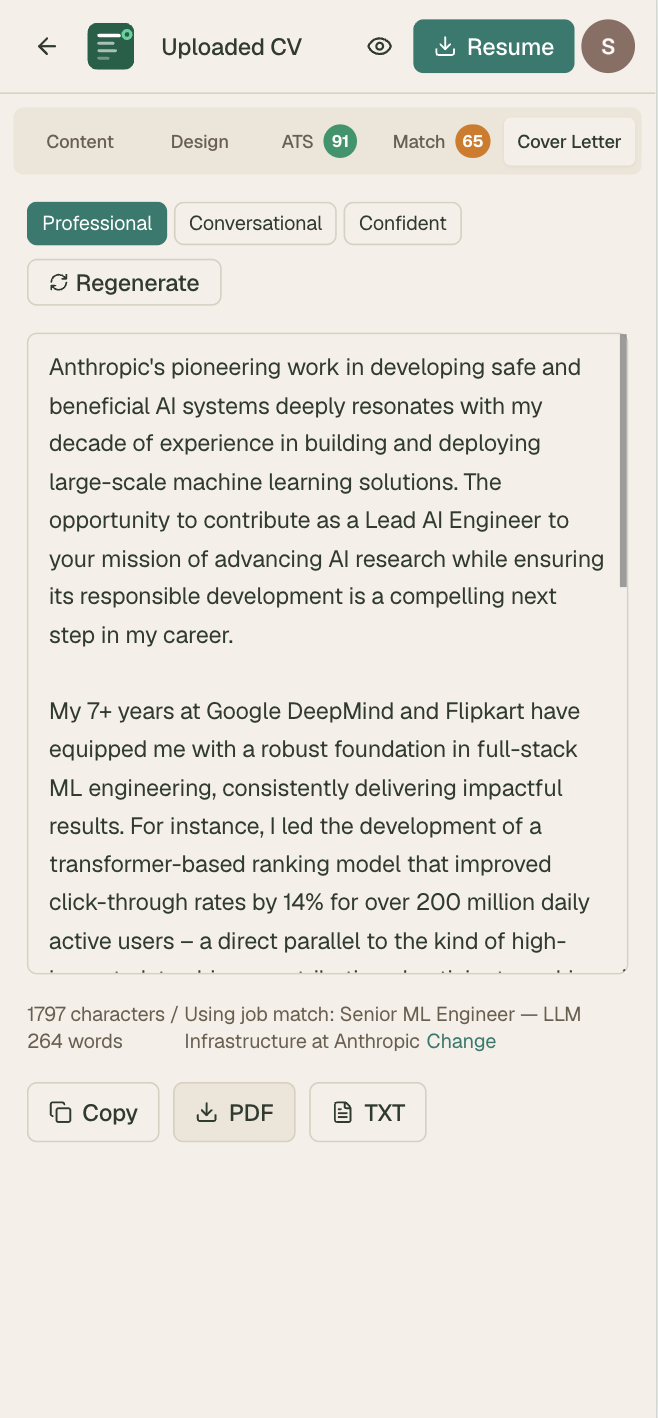
Full editor functionality on mobile. Tab-based navigation. ATS and job match panels fully responsive. PDF export on all devices.
Impact & Results
What Got Shipped
| Component | Complexity | Prompts used |
|---|---|---|
| CV editor — all sections + real-time ATS | High | 8 prompts |
| ATS scoring — 6 categories + keyword engine | High | 4 prompts + 3 iterations |
| Fix All with AI — git diff drawer | Very High | 6 prompts across 3 agents |
| Job match + red flags + offer evaluation | High | 5 prompts |
| CV tailor per JD | Medium | 2 prompts |
| Cover letter — 3 tones | Low | 1 prompt |
| Interview Coach — STAR stories | High | 7 prompts |
| 11 CV templates | High | 11 prompts — 1 per template |
| E2E testing + GitHub Actions CI/CD | High | 4 agents + 3 debug iterations |
| Admin panel + test management | Medium | 4 prompts |
| Marketing homepage — all sections | Medium | 6 prompts |
Design System Outcomes
- Single semantic color system used consistently across 40+ components
- 5-variant chip system handles all signal types without new patterns
- Design decisions documented and reproducible by any engineer
Business Model Insight
Making CVEdge free required understanding the unit economics of AI infrastructure. At Gemini Flash pricing, the heaviest power user costs $0.013/week in AI tokens. That single calculation — which I ran myself — changed the entire product strategy from a subscription model to a free-forever model monetised through job board PPC.
Key Learnings
1. Precision is a Design Skill
Writing prompts forces precision that design documentation rarely achieves. "Make it feel lighter" doesn't work in a prompt. "Reduce padding from 24px to 16px and change background from #F7F5F0 to white" does. The discipline made my design thinking more precise — not just to the AI, but in how I communicate with engineers generally.
2. Systems Thinking Is What Scales
50+ prompts over 6 months maintained visual consistency entirely because of CONTEXT.md — not because I remembered every previous decision. A design system is only as good as its enforcement mechanism. Embedding the system in the context the AI reads is the most effective enforcement I have found.
3. The Designer's Value Moves Up the Stack
When the gap between design intent and shipped code collapses, the designer's value shifts from specifying pixels to making product decisions. Should this feature exist at all? Does this mental model match how users think? What should happen in the edge case? These are the questions that matter — and the ones AI can't answer.
4. AI Amplifies Your Existing Instincts
Vibe coding doesn't replace design judgment — it amplifies it. A designer with weak instincts will build a product with weak instincts faster. A designer with strong instincts will build a better product faster. The quality ceiling is still the designer's quality ceiling.
5. Prompts Are Design Artifacts
I treated every Claude Code prompt as a design artifact — structured, versioned, reusable. The prompts are documentation. They describe exactly what was built, why, and what was explicitly excluded. Future team members can understand every product decision from the prompt history.
6. Operational Design Is Product Design
The admin panel, the prompts table, the rolling usage windows, the JSONB columns — none of these show up in a user flow. But they determine whether the product can be maintained, iterated, and scaled without pain. Operational design is product design. It just runs on a longer feedback loop.
Reflection
CVEdge taught me that designing for scale means designing for trust — not just for tasks.
The easy version of this product was a CV scoring tool with a paywall. The hard version — the one worth building — required rethinking the business model, the interaction patterns for AI-assisted editing, the trust framework for automated rewrites, and the mental models of users who don't know what ATS means.
The 8-minute fix time isn't a performance metric. It's a design metric. It means we removed everything that didn't need to be there.
What vibe coding changed about how I design
The ability to move from insight to shipped product in a single session changes how product decisions get made. The best decisions in CVEdge came from seeing something working quickly and reacting to it — not from planning in a vacuum. Vibe coding enables that feedback loop at a speed traditional development cannot match.
As design tools become more capable and AI becomes a collaborator rather than just a subject — the designers who understand how to direct AI precisely, maintain systems across long build cycles, and make the product decisions that AI cannot make will have a compounding advantage.
CVEdge is the proof of concept for that thesis.
Personal Growth
- Prompt engineering as a design discipline — precision, structure, iteration
- Multi-agent coordination for complex feature development
- AI-assisted product development from concept to production
- Designing human-in-the-loop interactions where trust is the primary UX concern
- Schema design for AI output storage — JSONB columns, version control in prompts table
- End-to-end product ownership including testing infrastructure and CI/CD
- Business model thinking — unit economics as a design input
CVEdge is a personal side project. All design, architecture, and prompt engineering by B. Sivarami Reddy. Built entirely through Claude Code prompts — zero manually written code.